Autodesk have created a video tutorial based on my work with XGen and Arnold.
Try Arnold

I thought I would have a go at testing the alLayer shader which is part of the alShaders by Anders Langland with Arnold for Maya.
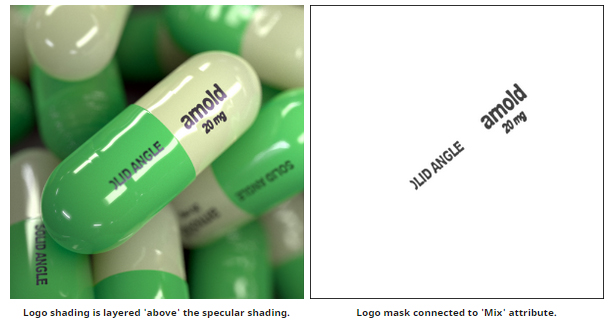
So I used the alLayer shader to layer two alSurface shaders together using an image of the text connected to the Mix attribute of the alLayer shader. The Mix image acts as a mask between the two layers. Therefore, the text will use the dull rough specular of the alSurface shader and will appear as if its floating above the bright sharp specular of the other alSurface shader.
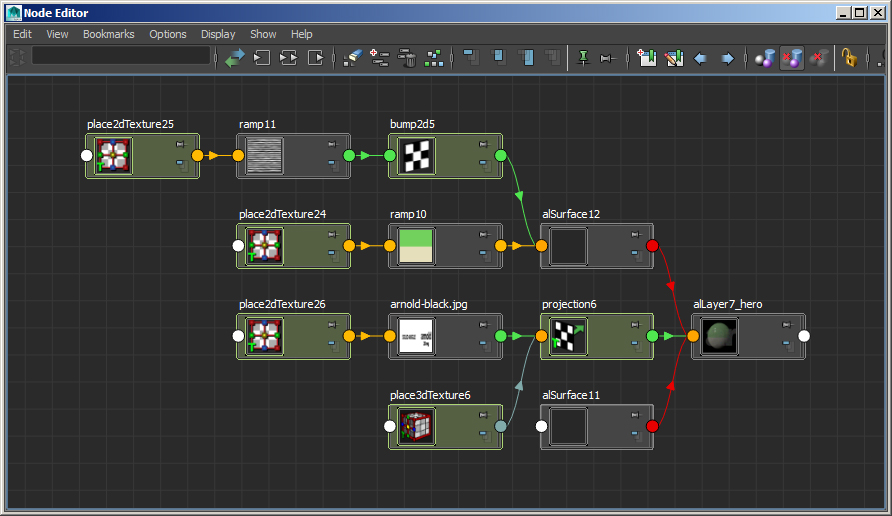
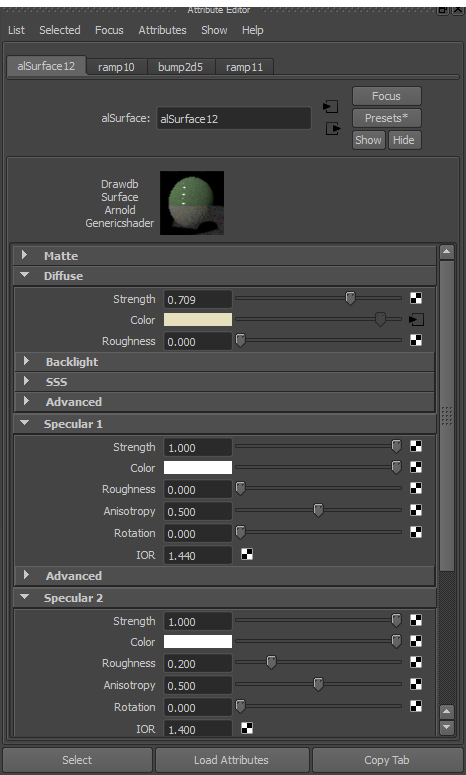
The nice thing about the alSurface shader is that it has two specular layers. This enabled me to add two specular effects on the pill. The first specular is sharp and the other has a higher roughness value to give a smoother hi-light.
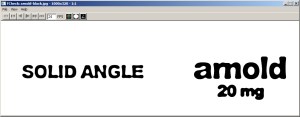
I used Arial bold for the font and used the ‘Photocopy filter’ in photoshop to give the impression that it has been printed badly onto the pill as I liked the way it merges some of the text.
A 3d texture projection was used to precisely project the texture onto the pill. When I originally positioned and scaled the projection node it cut off the beginning of the Solid Angle text. I kept this effect as I noticed that the printing on pills isn’t perfect.
The scene is lit with a hdri connected to a skydome light with two long thin cylinder area lights to add specular reflections along the ‘hero’ pill.

Finally, thanks to a suggestion from Angel Jiminez, I thought I would have a go at mocking up a fake advert for Arnold.

3D Artist Issue 75 – Top 10 Portfolio
Very honored to appear in the top 10 portfolio websites in Issue 75 of 3D Artist magazine.

3D World – Issue 189
The tutorial Guide to Rendering with XGen and Arnold that Pedro Gomez and I worked on is available in issue 189 of 3D World magazine.

Daily Planet Show

I was very pleased to see my work with XGen and Arnold featured on the Daily Planet Show on the Discovery Channel.
The clip is here.
Many thanks to Blake Glasbergen (video Archivist for Discovery Channel Canada’s Daily Planet).
Creators Project/ Vice Feature
There is a feature about me and my work on the ‘Creators Project/ Vice’ website.
Autodesk MasterClass: Rendering Curves with Arnold for Maya
I am pleased to see that my Autodesk MasterClass is now up on the Area website. If you want to watch a boring, sleep deprived man witter on about curves for an hour, then this is just the video for you.
Autodesk AREA artist of the month
Very pleased that the Autodesk Area site has made me artist of the month:
Maya XGen Colored Cubes and Spheres Rendered with Arnold
Some more tests with XGen archives and spheres. This time with a bit more color. I basically use a texture map to ‘drive’ the length and color of an XGen primitive. These primitives can range from spheres, splines or as in most of the examples below, cube geometry that has been exported as an archive. I then use expressions with XGen in Maya to modify the length, size and orientation of the archives.
Finally, I use the Arnold software renderer to create the final image. Arnold is able to realistically render millions of these pieces of geometry very quickly at high resolutions without any problem.
A tutorial that goes through the process can be found here. All of the images are rendered with Arnold for Maya. Click here to view my initial tests without color. Click here to view more XGen tutorials.
Many thanks to Pedro F. Gómez for his assistance with XGen. Featured on: Daily Planet Show, COLOSSAL, GIZMODO, THE VERGE, theCreatorsproject, CREATIVE BLOQ, 3dtotal, BEHANCE, SPLOID, LESTERBANKS, CG RECORD, ronenbekerman, CGFeedback, DIGITAL PRODUCTION.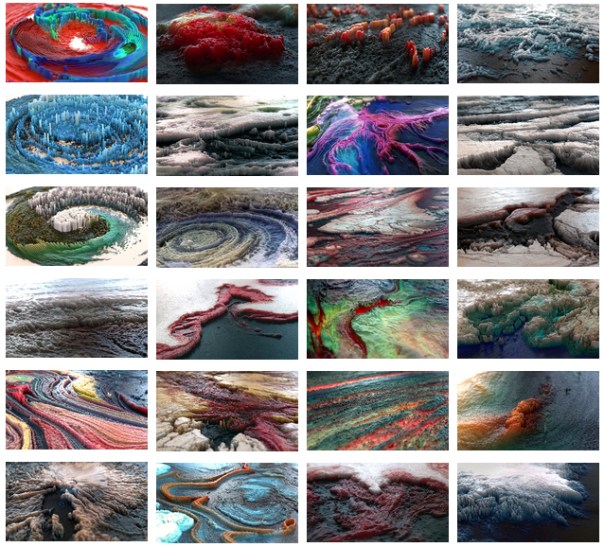
Its nice to see that my work has inspired other artists to also have a go. Please share your results with me!
https://www.artstation.com/artwork/BWX06
http://cgterminal.com/2014/09/01/cinema-4d-colorful-abstract-x-particles-tutorial/ http://paessel.com/blog/2014/08/24/converting-pixels-to-voxels-in-blender-with-pythong.html http://bertrand-benoit.com/blog/2014/08/07/griggles/ https://www.facebook.com/beeple/photos/a.10150428845566781.356955.95211636780/10152255873401781/?type=1&theater http://vimeo.com/104469156 http://paulsheehy3d.blogspot.com.es/2014/08/xgen-primitives-in-maya.html http://vimeo.com/103107232 http://www.ronenbekerman.com/forest-pack-texture-distribution/ http://www.cgmeetup.net/home/making-colorful-abstract-with-x-particle-in-cinema-4d/ https://www.facebook.com/photo.php?fbid=10152449739139775&set=gm.680935698642325&type=1&theater http://community.thefoundry.co.uk/discussion/topic.aspx?f=8&t=92074 http://lwtoa.com/forum/viewtopic.php?f=5&t=33&sid=bdcd15e55399adb78bc5af6b96a8e346 https://www.behance.net/gallery/38001119/Chroma-Landscapes
http://www.lovbomb.com/ https://www.behance.net/gallery/19418997/Texture-Distribution http://greyscalegorilla.com/blog/tutorials/fast-3d-topographies-in-cinema-4d-tutorial/ http://2014.blendermonth.com/?p=1607 http://forums.newtek.com/showthread.php?143497-mutated-ladscapes http://community.thefoundry.co.uk/discussion/topic.aspx?f=8&t=92074 http://www.3rd-floor.org/portfolio/abstract-landscapes https://www.behance.net/gallery/20212217/Abstract-Scapes-I https://www.behance.net/gallery/19971111/3D-Topography-Design https://www.behance.net/gallery/19853135/Tiny-World-Pt2
http://community.thefoundry.co.uk/discussion/topic.aspx?f=8&t=93404
http://henri-hebeisen.com/article14/abstract-landscape
http://dominikraskin.com/2014/09/28/digital-landscapes/
http://www.cutsquash.com/2014/08/abstract-landscapes-blender/
http://blenderartists.org/forum/showthread.php?346181-Colored-primitives
http://www.swirlypillow.com/sparkly/
http://www.deviantart.com/art/Crater-481208172
http://davidjohnrobertson.co.uk/343541/4658061/gallery/lee-griggschris-schmidt-enspired-blocks
https://pbs.twimg.com/media/CuGmgXdWcAAGwNW.jpg:large
http://www.maximeroz.com/abstract#2
http://mareyuspictures.com/nebula-cinema-4d-arnold/
http://www.fubiz.net/2015/12/05/abstract-landscapes-digital-manipulations/
https://www.behance.net/gallery/50671661/HoudiniMantra-Renders-inspired-by-Lee-Griggs
http://armieri.deviantart.com/art/Lee-Griggs-Tribute-537141643
http://blender.stackexchange.com/questions/15488/creating-a-scene-with-huge-amount-of-geometry
https://www.instagram.com/legible/
https://www.behance.net/gallery/20605983/CGI-CG-PHOTOGRAPHY-CG-EXPERIMENTING
https://pbs.twimg.com/media/CstMbmBXEAAajXE.jpg:large
http://paulsheehy3d.blogspot.com.es/2014/08/xgen-primitives-in-maya.html?m=1
http://www.davidcurtis.co.uk/pflow-world-map/
https://www.instagram.com/_waarp_/
http://www.maximeroz.com/#/new-page/
https://www.instagram.com/p/BKGlmOyh–o/
Skin Deformer

Here is an animation I did a while back. I decided to re-render it as a gif using the latest Arnold Skin shader for Maya.
- The mesh is called Diatom and was exported from Xenodream as an .obj.

- I then applied a bend deformer to the mesh and keyframed the rotation.

The interesting thing that occurs when deforming geometry in Maya is that the normals get flipped. This creates quite an interesting effect when combined with the Arnold Skin shader which requires normals to be facing outwards. I used the default Skin settings except I increased the radius multiplier to get a softer ‘jelly’ look to the SSS and increased the Shallow Scatter to 1.

 arnold-rendering.com


You must be logged in to post a comment.