Pingo has created a 3D Jewellery Visualization course that uses Arnold for C4D, with over 5 hours of material in 20 lessons.
Arnold 5 Cryptomatte

Psyop have announced the beta release of Cryptomatte for Arnold 5, as well as version 1.2.0-Beta of the Cryptomatte specification, and reference Nuke implementation.
Note that this is a beta release, both for AlShaders and Nuke.
Arnold 5: (AlShaders2): https://github.com/anderslanglands/alShaders2/releases
Nuke and Fusion: https://github.com/Psyop/Cryptomatte
Arnold 5 Cryptomatte
Cryptomatte for Arnold 5 is being released as part of AlShaders, as before, but is now a standalone node. Arnold 5.0.1 adds support for “AOV shaders”, which allow code to run on all materials in a scene, without manually connecting passthrough nodes. This improves the workflow in numerous ways. Using a central AOV shader node gives easy access to global Cryptomatte settings (on the one central Cryptomatte node). It is now also much easier for a studio to create a customized version of Cryptomatte, since the code does not need to be embedded in a surface shader. In addition to adopting the AOV shader methodology, we’ve added other features as well, such as sidecar manifests that work with deferred-loaded stand-ins, and “integer offsets” for modifying names.
Arnold 5 Documentation: Cryptomatte documentation, MtoA, MAXtoA, C4DtoA, HtoA.
Quixel Megascans
Quixel have an impressive library of scanned assets available for rendering with Arnold. Below is a test render using one of their wood stump assets.

Free HDRI Sites
Some free HDR maps can be downloaded from the websites below:
http://www.maximeroz.com/hdri/
Arnold 5.01
Arnold 5.01 is now available. Release notes (MtoA) here.
Some of the enhancements include:
Crytomatte support.
Perspective Camera – Radial Distortion.
Improved Thin Film added to Standard Surface.
Render polymesh as a volume.


HDR Studio Lights
Pingo has a collection of realistic HDR Studio Lights with some free samples available for download. These would be ideal for connecting to the color attribute of an Arnold light such as Quad or Disk to give realistic color and reflections.
Color Management in Arnold for Maya
An introduction with some basic concepts and explanations around OCIO config and synColor config files has been added to the MtoA (2017) user guide in the links below.
Skin Shading Using Standard Surface in Arnold 5
Skin shading is very simple using the Standard Surface shader in Arnold 5. From the Arnold user guide:
“When rendering skin, you would use a Radius color value like R:1.0, G:0.35, B:0.2, indicating that red should scatter deepest and green and blue less. This would replace the three layer workflow for skin where you would make the deep layer red to indicate that deep should scatter with a larger radius. Setting scatter_radius.R to a larger value would correspond to that.”
Below is a an example of such a skin shading setup (digital Emily files can be downloaded here).

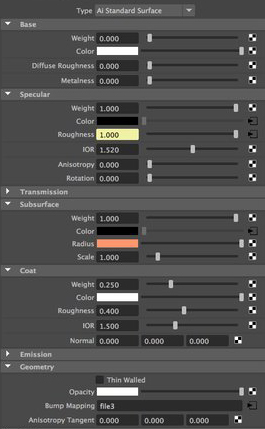
Arvid Schneider has created a video that goes through the skin shading process:
Bifrost and Arnold
Multi-Verse (USD/Alembic/MaterialX)
Paolo Berto from Multiverse has some interesting tools to add complexity in Maya (with support for Arnold 5) that also includes using ABC data from Houdini (with velocity blur on varying topology). More videos here.
 arnold-rendering.com
You must be logged in to post a comment.